New — Live in-game analysis & answers

Know their next call.
While your team knows theirs.

OFFGRD turns your Hudl breakdown into situation-by-situation predictions, your playbook into a program-wide teaching system, and your Friday night into a series of answered questions — offense and defense, with live AI analysis on every snap. Offline on the sideline. Synced to your whole staff.

See the suite
14-day full trial — every feature, no card. Your scouting stays visible after.
One program library · Coaches plan, players train, everyone syncs · Hudl & QwikCut imports · No internet needed at game time
Madison Tigers vs Southwest Longhorns  ·  3rd & 7  ·  plus 34  ·  Q2 7:42 Live · Zero bars
They're most likely in
Cover 4
54%then Cover 3 · 36%
HIGH CONFIDENCE28 snaps · recency-weighted · incl. 6 live tonight
Your best calls vs this look
KARATE COMBOCall
HOUSTONCall
Coverage distribution
Cover 4
54%
Cover 3
36%
Cover 1
11%
Pressure
32% · Mike A
Front
4-3 · 90%
Live shift detected
Cover 1 up 29% tonight — man-beaters live
O + D
Call both sides
≤3 taps
To log a snap
Every snap
AI analysis recomputed
0 bars
Needed on gameday

The whole week in sixty seconds.

Chart the film once. Call the game from it Friday night — offline.

Film tells you what happened. OFFGRD tells you what's coming.

Everything lives in one shared library. Draw a play once and it's on every coach's screen, in every player's quiz, and on your call sheet — synced automatically, ready offline when the stadium wifi dies.

01

Predict it

Import a breakdown and get coverage, front, and blitz probabilities by down, distance, and field zone — with confidence levels, not guesswork. Log what they show on Friday and the prediction sharpens live.

02

Teach it

Your playbook isn't a PDF — it's animated, tagged, and testable. Players take reads tests, coverage-ID tests, and route quizzes built from your plays. Coaches see every score.

03

Call it

Game night, the O and D Callers put the predicted look and your best calls on one glanceable screen — with a live AI analysis panel reading every snap. Fully offline. Dead stadium wifi is somebody else's problem.

From film to Friday night, the whole journey.

One system takes your program through the week — manage the team, decode the opponent, plan the practice, test the roster, and call the game. Every step feeds the next.

Saturday

Film lands. Upload it as-is. Scout

Export the Hudl or QwikCut breakdown and drop it in — no conversion, no re-tagging. Within minutes you know their coverage, front, and blitz tendencies by down, distance, and field zone.

From Hudl to game plan in 80 seconds.

Sunday

Build the gameplan Sunday night — and assign the tests with it. Playbook · Reps Lab

Attack plans against each of their most likely looks. Pull plays from your book or draw new ones — animated, tagged, and instantly teachable — and every play in the plan is testable the moment you save it. Assign the week's tests and the roster is studying the plan before Monday's practice.

Read the scout. Build the plan. Same morning.

Assigned Sunday. Studied by Monday.

Monday

Set the week from the Coaches Hub. Coaches Hub · Flywheel

Roster, depth chart, schedule, and daily check-ins in one place — Friday's bust and missed-fit tags arrive already ranked, and Sunday's first test scores show who's already studied. Confirm the practice focus and the whole week aims itself.

Tue – Wed

Practice with purpose. Dial the plan daily. Reps Lab · Scout cards

Each morning's scores show what the roster actually absorbed. Drill what the tests expose, trim what they've mastered, and adjust the gameplan while there's still time to fix it. The scout team shows the opponent's actual plays off auto-printed scout cards — nobody hand-drew a thing. ▶ watch how

Scout cards that build themselves

Every opponent play — offense and defense — pre-built from the film you charted. Polish a dozen cards. Draw zero.

Thursday

Final check: who's ready, what to walk through. Reps Lab · Results

By Thursday it isn't a guess — a week of scores by player and position says who's ready, and the Results board hands your staff the exact looks to hit in the walkthrough. Testing all week is how the gameplan gets dialed in, one day at a time. ▶ watch how

Friday

Call the game — both sides, AI on every snap. O + D Callers · In-game AI

Predicted look, your best calls, live analysis recomputed every snap — fully offline. The system answers the questions so you can do what you do best: coach.

Friday night. Zero bars. Every answer.

Predictive analytics × focused testing × purposeful practice. Never off guard.

Then it loops: Friday's tags become Monday's focus, and every week your program gets sharper.

From film study to Friday night, one system.

Scout, Playbook, Reps Lab, the O & D Callers, and the live in-game AI share one cloud library — draw a play once and it's on every coach's screen, in every player's quiz, and on your call sheet. And what happens Friday flows straight back into Monday's practice.

Scout & Predict

Their tendencies, decoded before warmups.

Upload the Hudl or QwikCut export as-is — no conversion, no re-tagging. OFFGRD maps the columns, skips the junk rows, and builds the picture: most likely coverage with confidence, pressure rate, front distribution, and the attack plan against each look.

Small samples are widened automatically and flagged — it tells you when to trust it.

Most likely coverage · 1st & 10
Cover 454%
HIGH CONFIDENCE based on 28 snaps · recency-weighted
Coverage distribution
Cover 4
54%
Cover 3
36%
Cover 1
11%
Attack — Quarters

Safeties carry verticals, so the flat is soft. Curl-flat · out routes · dig/over · RB swing

Playbook — Draw & Animate

See the play move before you ever run it.

Formations, routes, motion, protections, blocking schemes, and full defensive looks — then hit Play and watch it all animate: motion fires first, then the snap, every route and drop in real time.

Tap any player and the right tools appear right under the field — routes and motion for skill players, protections and blocks for linemen, zone/man/blitz for defenders. New program? Start with the 12-play tagged starter book, not a blank page.

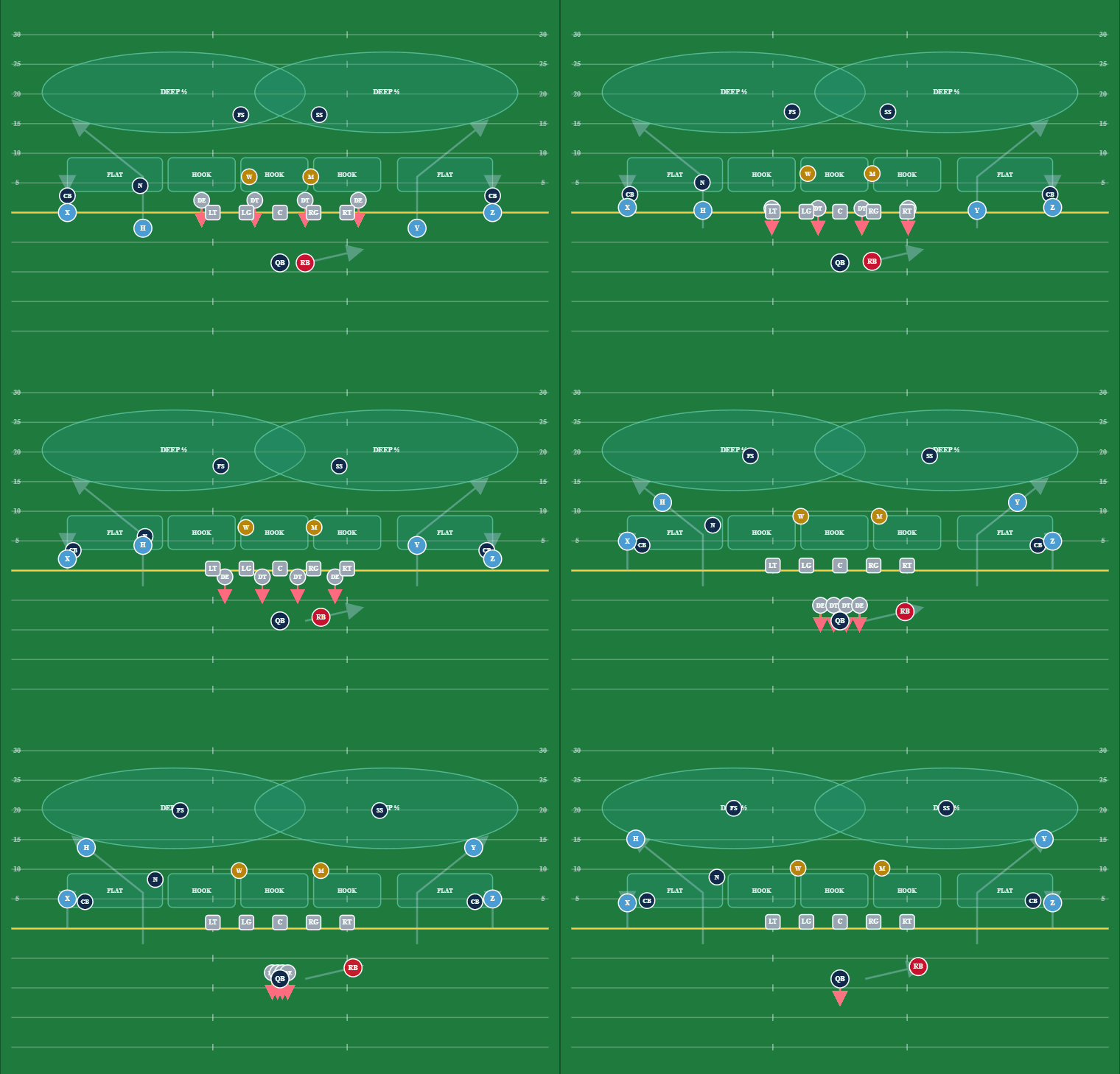
OFFGRD Playbook animating Smash vs Cover 2 — routes and coverage drops moving in real time
Scout Cards — the Sunday-night killer

The card stack draws itself.

Hand-drawing scout cards is the biggest time-sink in a high school week — so OFFGRD kills it. Any play with a diagram — your installs or the opponent's imported plays — becomes a printable scout card: the exact drawn play plus a call strip in your program's own terminology.

Pick a scope — install day, vs-opponent, by down & distance — and batch-export the whole stack to PDF, 4, 6, or 9 cards a page. The scout team shows real looks Wednesday. Nobody's up drawing cards Sunday.

Batch PDF — 4/6/9-upInstall cardsOpponent cardsPrint & PNG
Trips RT — Flood11 pers
Doubles — Smash11 pers · 3rd & 6 · L hash
Madison TigersCard 4 of 18
Reps Lab — the piece nobody else has

Your whole roster, tested on your system.

Every play saved in your Playbook becomes teaching material automatically. Quarterbacks read defenses frozen pre-snap, hit Snap, and make the throw. Receivers prove they know their routes. Anyone can name the coverage from the drop.

Three graded test types — Reads, Coverage ID, Route quiz — every score saved to the program, by player and position. Reps earn points, streaks, and a spot on the position board — so the roster competes to know the gameplan. Test all week, not just once: assign with each install, read the scores each morning, and dial the gameplan daily. You'll know who's ready before the lights, not at halftime.

OFFGRD Reps Lab — reads test graded to the roster
Callers — game night Now O + D

Both sides of the ball. One glanceable screen.

Down, distance, hash, field zone — the Caller shows the predicted look and your best calls against it — ranked by the Matchup Engine, which blends how each play attacks that look on paper with your own live results. Every suggestion wears its evidence: Scheme Match or a real success rate with the snap count. Tap Call to log it, mark Hit or Miss, and the rankings sharpen all night.

The new D Caller runs the same loop for your defense — Sit → Expect → Call → Result, three taps or fewer per snap — and flags live when their tendencies shift from the season film. Log what they show and every prediction updates mid-game. Everything runs on-device: the stadium's wifi can die and your call sheet doesn't care.

Play 27 · your ballO Caller
Last playHOUSTON2nd & 4-6 · Cover 4 · Hit
1 Sit2 Call3 Look4 Result
Next · down & distance
1ST2ND3RD10+ANY hash
Expect: Cover 4 43% · 4-3 · 30% pressure · 10 snaps · 1 live
Blitz trend: 30% pressure here — protect hot & check
1st & 10 openers — ranked vs the predicted look
1.3HOUSTON75% · 8 snapsCall
1.5CALIScheme matchCall
Best: Cali — high-lows the flat defender vs their Cover 4
Play 28 · their ballD Caller
Last playRUN1st & 10+ · Cover 1 · No gain
1 Sit2 Expect3 Call4 Result
Their situation
1ST2ND3RD10+ANY
Expect: RUN 53% · 3x1 19% · 2x2 17% · motion 0% — 62 snaps · 17 live
Breaking tendency: pass 17/17 tonight · season run 67%
Your D call
4-33-4NickelCover 1Cover 3Mike A-gap
What they ran + yards
RunPass+2 yds
Sit → Expect → Call → Result  ·  ≤3 taps a snap  ·  both sides, fully offline
In-game AI New

A coordinator's eye on every snap. Live.

A live analysis panel sits right under the call loop — offense and defense — and recomputes the moment every snap folds in. Drive summaries, tendency shifts versus their season film, and situational reads stream into one feed, with zero extra taps to log.

And now you can ask the booth anything — type "what's beating us?" and get a streamed answer built only from tonight's snaps, every number verified against the actual data before it renders. Quarter and half are one-tap bookmarks, the engine runs on-device with zero bars, and the preset questions answer instantly even with no connection at all.

Live analysis — 2nd quarter, 7:42
Shift3rd & medium: Cover 1 67% tonight vs 38% season — man-beaters are live.
DriveThey went 4-of-5 outside the hashes — perimeter run fits leaking on drive 3.
ReadRed zone: 2-high both trips — expect the flat to stay soft.
Booth"What's beating us?" — 3 of their 4 chunk plays came off Mike A-gap pressure. Slide the line, swing the back.
HalfOne tap expands the full half analysis right here. No modal, no wifi.
Game → practice flywheel New

Friday's mistakes become Monday's reps.

During the final review, tag the snaps that hurt — busts and missed fits. OFFGRD ranks them by scheme and situation and hands you a proposed practice focus. You confirm it; nothing auto-applies.

A confirmed focus raises a tracked cell and up-weights next week's player tests on exactly that look — so kids earn the fix by drilling it, and you watch the scores climb from the Results board. Game to practice to game, one loop.

Final review — proposed focus
1Cover 3 bust
3rd & long · 3 tags tonight
Confirm
2Missed fit — perimeter run
1st & 10 · 2 tags
Confirm

Confirmed → next week's Coverage-ID tests up-weight Cover 3 / 3rd & long for the DBs.

Auto-Scout Early access

Point a camera at the film. Get a draft breakdown.

Auto-Scout reads still frames of each snap and drafts the defensive picture for you — coverage shell, front family, rotation — so tagging a game starts from a draft instead of a blank row.

Every AI tag carries an honest confidence score and lands in a coach review queue. Nothing unreviewed ever touches your tendencies — you stay the tagger of record; the machine just does the first pass. Early access — rolling out program by program.

Auto-Scout — review queue
Snap 14 · 2-high shell0.86
Snap 14 · 4-down front0.81
Snap 15 · 1-high → Cover 3 (post-snap)0.74
Snap 16 · shell unclear — flaggedNeeds review

Low-confidence rows wait for a coach — unreviewed tags never feed predictions.

Coaches Hub — mission control

Run the program, not the paperwork.

Roster, depth chart, calendar, daily check-ins, and team messaging — one hub, one login. The readiness board flags who needs attention before practice, not after, and quick actions put the whole program two taps away.

Daily check-ins flag issues early, the AI GM drafts your weekly package, and when it's time to get your kids seen, the full OFFRD recruiting suite is one tap away. That's hours of admin every week, handled.

Coaches Hub — roster readiness
3 Ready12 need attention
Total players15
Active this week15
Daily check flags2
Quick actions
Add playerMessage teamDepth chartRecruiting
Review 12 players →
OFFRD Recruiting

Get your kids seen. Keep the receipts.

The full OFFRD recruiting suite lives right beside your program. Promote a player — film, measurables, profile — to over 10,000 college coaches in a few clicks, straight from the roster you already manage. Every player gets a personal recruiting profile on your custom team recruiting page: your brand, your kids, one link to send.

And every bit of it is verified, tracked data — who you sent, who opened, who watched film. So when a parent wonders whether anyone's fighting for their kid, you don't have to say a word. Pull up the record: 132 coaches reached, film in front of D1 staffs — this week. The work speaks for itself.

10,000+ college coachesVerified promotion recordCustom team pagePlayer profiles
Promote — WR J. Carter '27
132college coaches reached · 3 clicks
This week
Profile views320
Film views115
Coach opensD1 · 83   D2 · 45
Team page visits1,046
carter27.offrd.teamPromote player →

Game-ready in your first session.

Coaches get a guided setup — name your program, set your logo and colors, take the 12-play tagged starter book, and share one join code. Players enter the code, pick their position, and take their first reps inside sixty seconds. A live checklist tracks the program until everything's green.

01

Coaches

Create the program → colors & crest → starter playbook → import a breakdown. The setup checklist follows you on every page until you're done.

02

Players

Join code → name & position → first training rep, immediately. Every test score lands on the coach's Results board.

03

The program

One shared library. Auto-sync every 45 seconds. Your logo and colors on every device the moment anyone signs in.

One program price. Whole staff. No per-seat contracts.

Free trial

14 days. Full product. No card.

  • Every feature, both sides of the ball
  • Scout & Predict + Auto-Scout tagging + the live O/D game-day caller
  • Your whole staff — unlimited coaches & players, no card

After 14 days: your scouting and film stay visible; imports and game-day tools pause until you pick a plan.

Program Season

$1,497 / season

or 3 payments of $537 — $1,611 total · pay once and save $114

  • Every coach on staff. Unlimited film. Offense and defense.
  • Scouting intelligence, Auto-Scout tagging, pre-snap read sheets, situational cheat cards, and the live O/D game-day caller.
  • No contracts. Works with the Hudl tags you already make. Keep your Hudl exactly as it is.
Get set up before Week 1
Is the 3-pay a subscription?
3 payments, then done. Season access either way.
Per-seat?
No. One price covers the whole staff.
Do we need to leave Hudl?
No — OFFGRD reads your existing Hudl breakdown.
What happens after the season?
Renews at season price; cancel before renewal if you're out.
What happens when the trial ends?
Your scouting and film stay visible. Imports and game-day tools pause until you're in.
Doesn't Hudl have AI scouting now?
It does — and OFFGRD reads it. Hudl's AI writes reports about what already happened. OFFGRD turns that same breakdown into what's coming next — this down, this distance, live on the sideline with zero bars. Film-room tools end on Sunday. OFFGRD is built for Friday night.

Questions coaches ask.

Does it replace Hudl?

No — it rides on it. Keep your film in Hudl; export the breakdown and upload it to OFFGRD as-is (.xlsx or .csv, no conversion). Hudl stores what happened. OFFGRD tells you what's coming and teaches your roster what to do about it.

Does it really work without internet?

Yes — and we test it in airplane mode on real hardware. Predictions, both Callers, the live analysis panel, the playbook, and training all run on-device; the app even cold-boots with zero bars. Anything you log offline — snaps, reps, check-ins — queues locally and syncs the moment you're back on a connection. No data held hostage by stadium wifi.

Can I call defense with it too?

Yes. The D Caller is a separate tab beside the O Caller, built for the defensive loop: see the situation, see what their offense most likely runs, make your call, log the result — three taps or fewer per snap. It watches for tendency shifts live (what they're doing tonight vs. their season film) and flags them so you can adjust before they burn you twice. Coach-only; players never see it.

What does the in-game AI actually do?

It reads every snap you log and keeps a live analysis current under the call screen — drive summaries, tendency shifts, situational reads — with zero extra taps. You can also ask it questions in plain English — "what's beating us?", "what do they run on 3rd & long tonight?" — and get an answer built only from tonight's actual data, every number verified before it renders. Quarter and half are one-tap bookmarks that expand the same panel. The analysis engine is deterministic and runs on-device, so it works fully offline; typed questions and AI-written summaries layer in when you have a connection, and the preset questions answer instantly with zero bars. It never slows down the calling loop.

Who owns the playbook?

The program. Your plays live in your team's account with roles — Admin, Coach·Edit, Coach·View, Player — so the whole staff builds one system and every player studies the same library. Export your playbook as a file any time.

How do players join?

One join code. They sign up, tap "I'm a player", enter the code, pick their position, and start training. Coaches see every test score by player under Results.

What does the coach have to build before players can train?

Nothing. Reps Lab ships with built-in concepts versus six coverages, and the starter playbook is testable the moment you load it. Add your own plays and the tests grow with your system.

Never off guard.

Set up your program, invite your staff, and call both sides of Friday night with an AI coordinator on your hip — no bars required.